For Philippine businesses and their bookkeepers

Made with accountants, for accountants and business owners.

Record your sales, bills and payroll once. Mage turns them into your books of accounts and fills in your VAT, withholding and income tax returns on the official BIR forms. Magica, your AI assistant, answers questions and drafts entries for you to confirm.

Mage prepares. You review and sign, then file and pay through BIR's own channels.

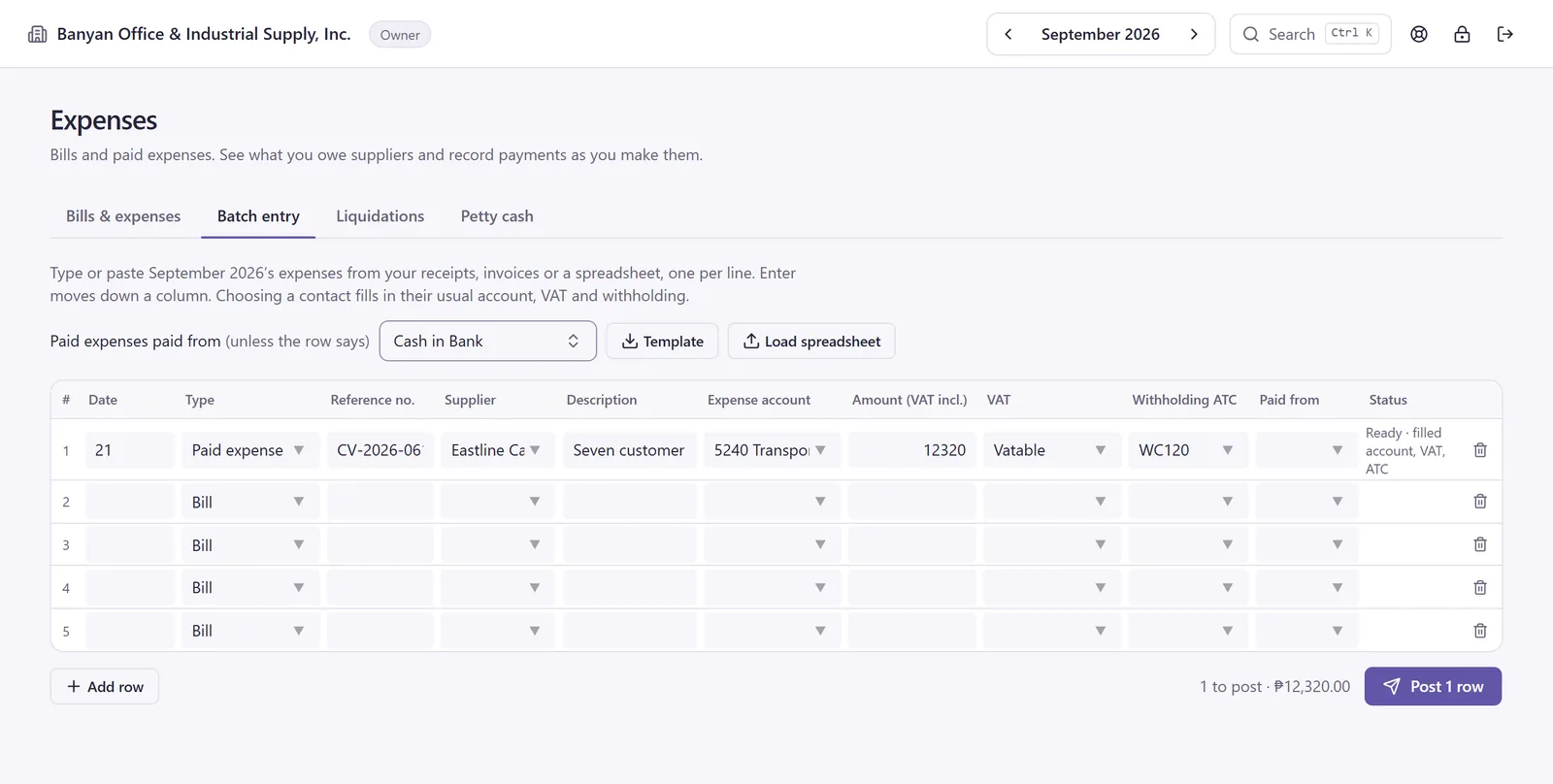
Batch entry with Eastline's delivery bill: account, VAT and withholding code filled in automatically, status Ready, 1 to post at ₱12,320.00

21 Sep 2026 · Paid expense · CV-2026-0613

Supplier Eastline Cargo & Delivery Services, Inc.

Seven customer delivery trips, delivery manifest DL-0921

Amount (VAT incl.) 12,320.00

Filled in from the supplier

Expense account
5240 Transportation and Travel
VAT
Vatable
Withholding ATC
WC120 · 2%

Status Ready · filled account, VAT, ATC

VAT ₱1,320.00 Net ₱11,000.00 Withheld (WC120, 2%) ₱220.00 Paid ₱12,100.00 Balanced ₱12,320.00 = ₱12,320.00

This one bill lands in six places:

  1. Your books Purchase journal and cash disbursements book, September 12,320.00 · VAT 1,320.00 · withheld 220.00
  2. VAT return 2550Q, Q3 2026 +11,000.00 into 44A · +1,320.00 into 44B
  3. Withholding return 1601-EQ, Q3 2026 +220.00 on the WC120 line
  4. Eastline's certificate 2307, Q3 2026 715.00 withheld this quarter, this bill's 220.00 included
  5. Summary list of purchases 990100001P092026.DAT D,P,"990300205","Eastline Cargo AND Delivery Services Inc.",,,,"58 Kamagong Ave","Paranaque City",0.00,0.00,11000.00,0.00,0.00,1320.00,990100001,09/30/2026 Eastline's only September purchase, so its line is this bill alone.
  6. Quarterly alphalist (QAP) 1601-EQ, Q3 2026 D1,1601EQ,3,990300205,0000,"Eastline Cargo AND Delivery Services Inc.",,,,09/2026,WC120,2.00,35750.00,715.00 Eastline's whole quarter, this bill included.
One bill. Six places. All read from the same entry. Sample data. Banyan Office & Industrial Supply, Inc. is a fictional sample company, and so are its suppliers, Eastline among them, and its customers.

Before Mage

One supplier bill. Typed five times. Wrong once.

Here's a ₱12,320.00 delivery bill from Eastline (a fictional supplier), done the usual way. Into the spreadsheet. Into the purchase journal. Eastline's TIN, ₱11,000.00 and ₱1,320.00 into RELIEF for the summary list of purchases. The withholding into the Alphalist module for the QAP. Onto Eastline's 2307 for the quarter, where ₱715.00 became ₱751.00. Then, at quarter end, the totals get added up all over again for the 2550Q and 1601-EQ.

With Mage

One entry. Everything else is read from it.

The same bill is one balanced entry. Your books, the 2550Q, the 1601-EQ, Eastline's 2307 and the DAT files are all read from it, so no list or certificate is re-typed and no total is added up twice. What's left for you is quick: write the month into your registered books from Mage's page-by-page templates, and key the return figures into eBIRForms or eFPS straight off Mage's filled form.

Before Mage · the usual way
  1. Spreadsheet

    21 Sep Eastline 12,320.00
  2. Purchase journal

    21 Eastline Cargo & Delivery Services, Inc. 12,320.00
  3. RELIEF

    TIN
    990-300-205
    Net
    11,000.00
    Input tax
    1,320.00
  4. Alphalist module

    ATC
    WC120
    Income payment
    35,750.00
    Withheld
    715.00
  5. Eastline's 2307 · Q3 2026

    Total tax withheld 751.00

    Margin note: should be 715.00

  6. Quarter end: add up the totals again into eBIRForms
With Mage
Entered once Balanced

CV-2026-0613 · Eastline

₱12,320.00

The balanced entry
Dr5240 Transportation and Travel 11,000.00
Dr1300 Input VAT 1,320.00
Cr2300 Withholding tax payable 220.00
Cr1010 Cash in Bank 12,100.00
Debits = credits 12,320.00

Read by:

  • Books
  • 2550Q
  • 1601-EQ
  • Eastline's 2307
  • SLP DAT
  • QAP DAT

What Mage does

Your books, payroll and BIR returns, from one set of entries.

Six parts of one app, all reading the same posted entries.

  • Record

    Sales and expenses, typed, pasted or imported.

    • Paste a month from Excel or Google Sheets, or import the file.
    • Pick a supplier, and its account, VAT and withholding code fill in.
    • Scheduled entries post recurring bills, invoices and journal entries once their day comes; one dated in a closed month waits until it reopens.
  • Books

    BIR books of accounts, page by page.

    • Cash receipts, cash disbursements, sales, purchase and general journals, and the general ledger.
    • Write them into manual books, print loose-leaf pages, or download an Excel working copy.
  • Payroll

    Pay runs with the statutory tables built in.

    • SSS, PhilHealth, Pag-IBIG and withholding on compensation, from dated tables.
    • Monthly, semi-monthly, weekly or daily, by branch, with a searchable payroll register.
    • At year end, each employee’s 2316 and the 1604-C.
  • Taxes

    Returns filled in on the official BIR forms.

    • VAT, percentage, withholding and income tax returns, with 2307, 2306 and 2316 certificates.
    • Summary lists, SAWT, QAP and alphalist DAT files.
    • Every due date on one calendar, and a filing record for each return.
  • Reports

    Where the business stands, any period.

    • Profit and loss, balance sheet, trial balance and general ledger, also by branch.
    • Customer and supplier balances, with statements of account for customers.
    • An annual FS draft with notes, on the Pro plan.
  • Magica

    An AI assistant that knows your books.

    • Answers how-to and Philippine tax questions, and shows you where to click.
    • Reads your totals, balances and unpaid invoices and bills.
    • Drafts entries, even from a receipt photo. Nothing posts until you press Confirm.
    Meet Magica ↓
Every form, DAT file and book Mage prepares 19 forms · 7 DAT file types · 6 books

Official BIR forms

19 forms

Filled in on the official BIR PDF, unsigned, for you to review and sign.

  • 2550Q Quarterly VAT return, April 2024 (ENCS)
  • 2551Q Quarterly percentage tax return
  • 0619-E Monthly remittance of expanded withholding
  • 1601-EQ Quarterly expanded withholding return, January 2019 (ENCS)
  • 1601-C Monthly withholding on compensation, January 2018 (ENCS)
  • 0619-F Monthly remittance of final withholding
  • 1601-FQ Quarterly final withholding return
  • 1604-F Annual return on final withholding
  • 1702Q Quarterly income tax, corporations and partnerships
  • 1702-RT Annual income tax, corporations and partnerships; 1702-EX and 1702-MX too
  • 1701Q Quarterly income tax, individuals
  • 1701 Annual income tax, individuals; 1701A and 1701-MS too
  • 2307 One certificate per supplier, each quarter, January 2018 (ENCS)
  • 2306 One certificate per payee of final withholding
  • 2316 One certificate per employee, each year, September 2021 (ENCS)

DAT files

7 file types

Written from your books in BIR's format, with names cleaned for it automatically.

  • SLS Summary list of sales, one line per customer
  • SLP Summary list of purchases, one line per supplier
  • SAWT The 2307s your customers gave you
  • QAP Alphalist of payees for the 1601-EQ and 1601-FQ
  • 1604-E Annual alphalist of payees
  • 1604-C Annual alphalist of employees
  • 1604-F Annual alphalist of final withholding

Books of accounts

6 books

Page by page with totals carried forward, ready to write into your registered books.

  • CRB Cash receipts book
  • CDB Cash disbursements book
  • SJ Sales journal
  • PJ Purchase journal
  • GJ General journal
  • GL General ledger, one account per page

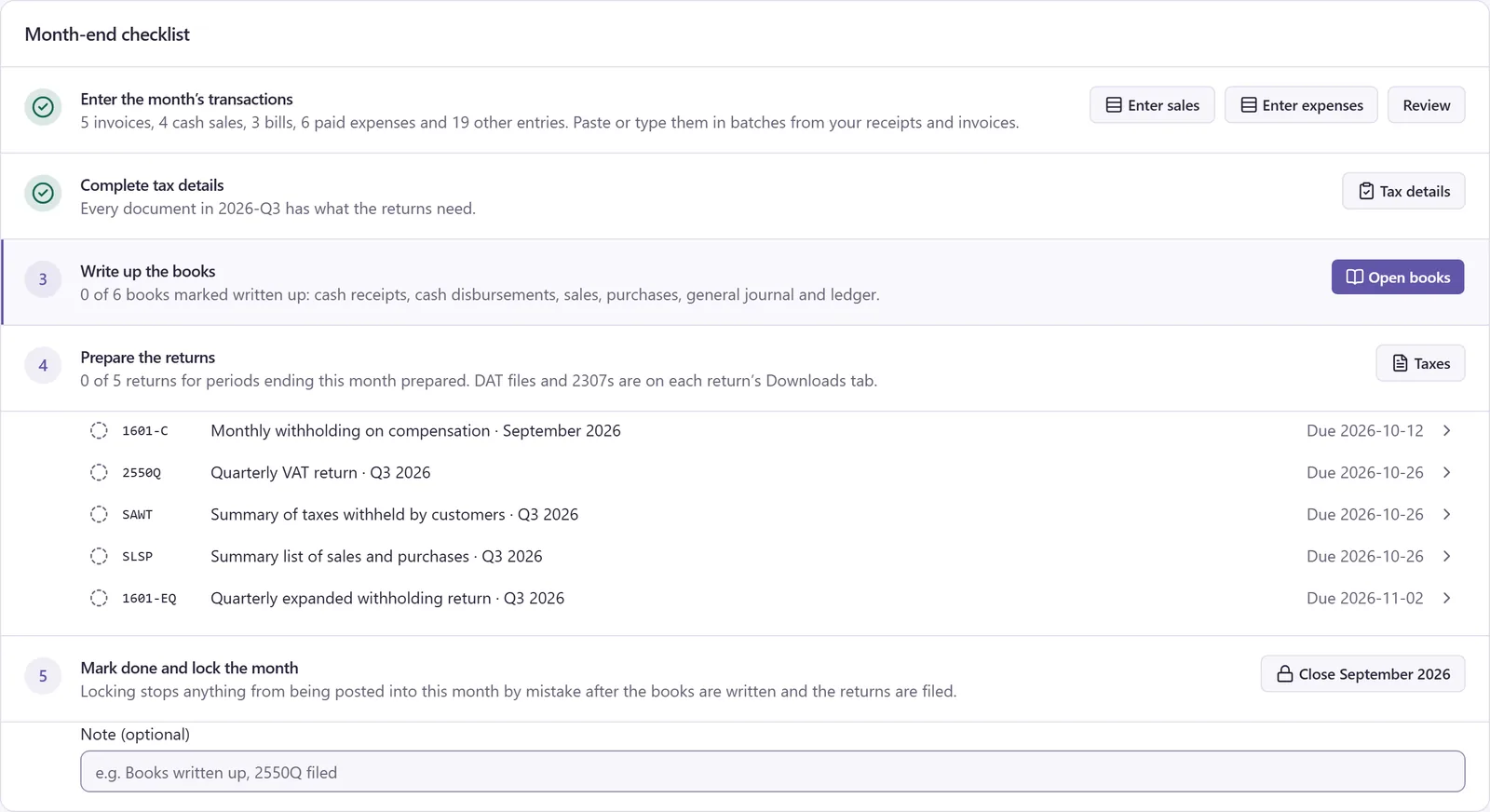
How a month works

From pasted rows to a locked month, on one checklist.

Five steps, the same for every company, and only the next one is highlighted. Here's September 2026 for Banyan Office & Industrial Supply, Inc., a fictional sample company.

Step 1: Enter the month's transactions

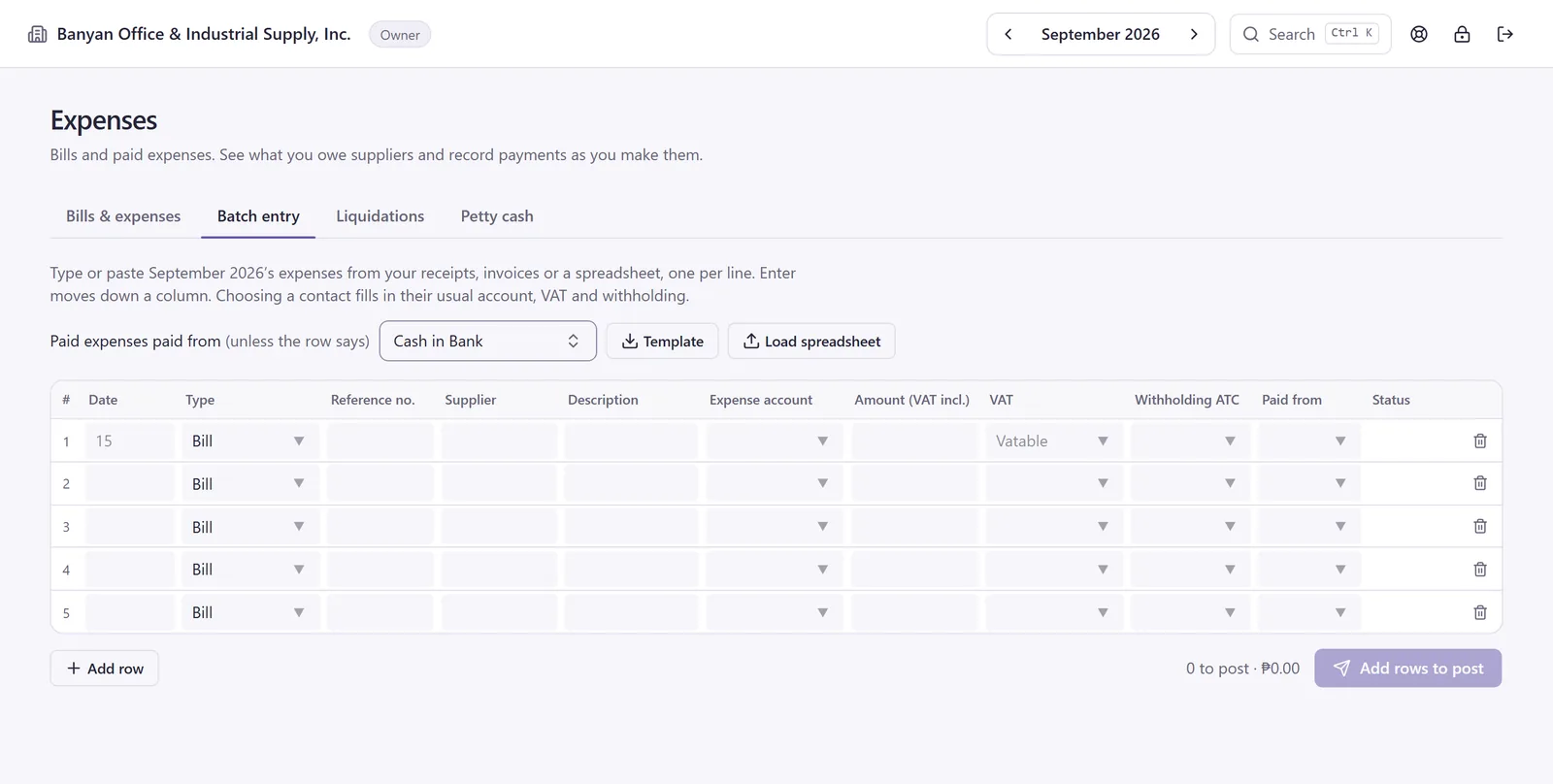
Paste a month of sales or expenses from Excel or Google Sheets into one grid, load an .xlsx, .xls or .csv, or type them in. Pick a supplier and Mage fills in the account, VAT treatment and withholding code. Each row posts on its own and shows its status.

Starting from scratch? Download the template, with dropdowns for your accounts and banks.

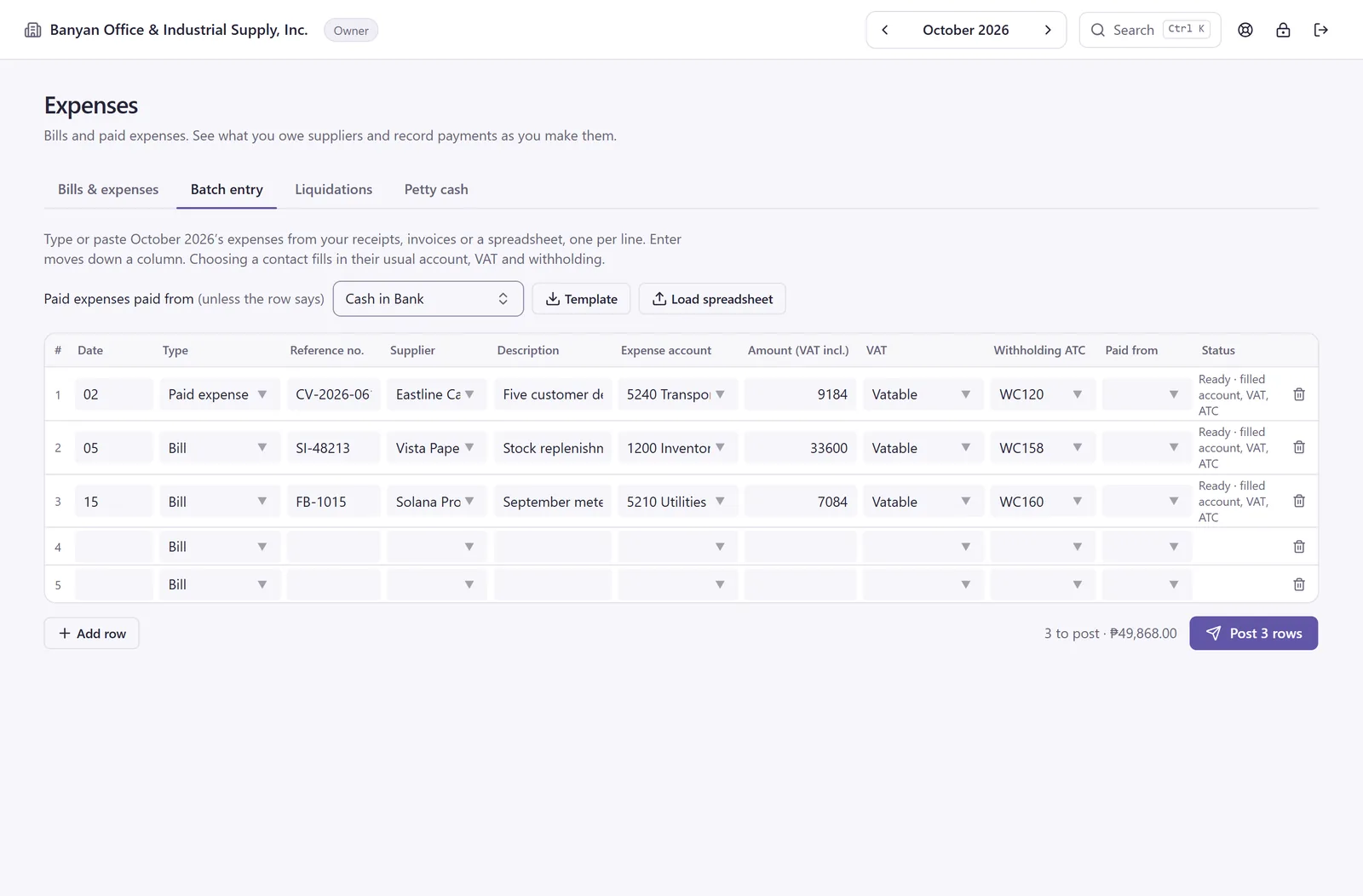
Batch entry for October 2026 with three supplier documents typed in, from the fictional suppliers Eastline, Vista and Solana. Each row is filled in with an expense account, VAT treatment and withholding code and marked ready, and the footer reads 3 to post, ₱49,868.00.
September is posted. October's first three expenses, each filled in from its supplier.

Step 2: Complete tax details

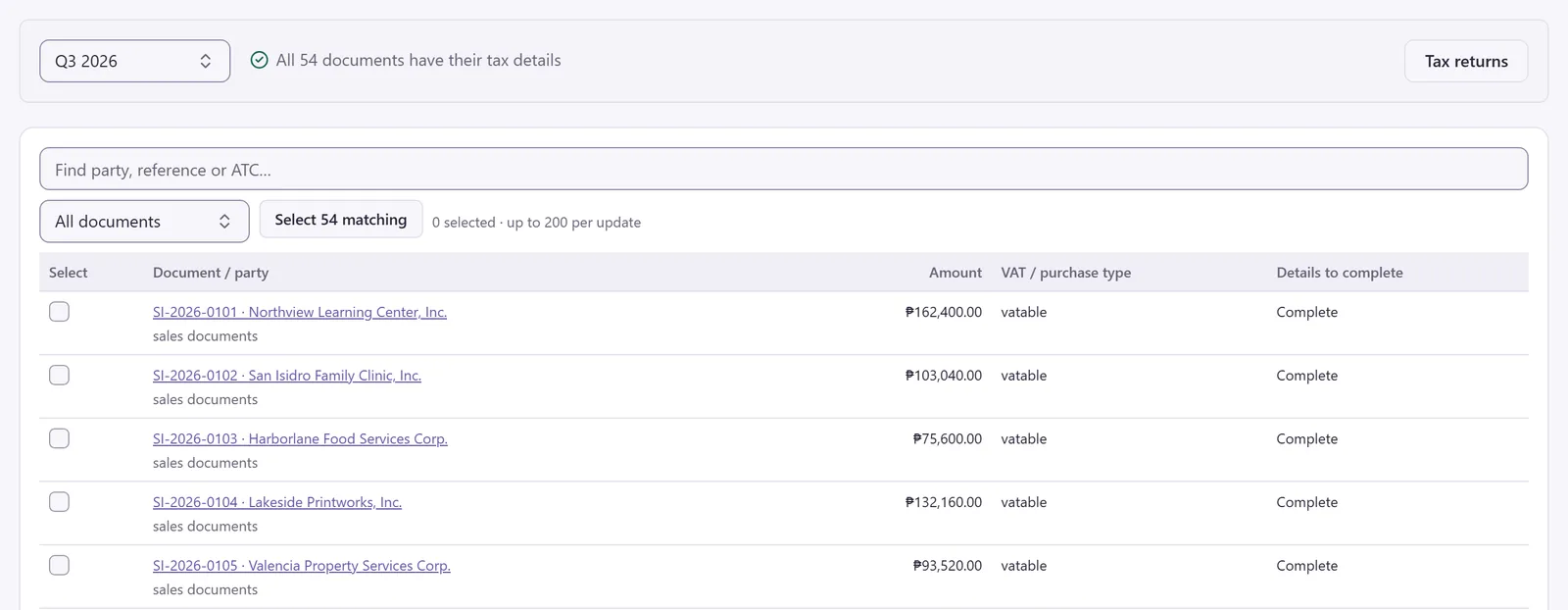
Returns and DAT files need TINs, addresses and VAT treatments. Anything missing for the quarter is listed in one table, and you can apply a treatment to up to 200 documents at once.

Tax details for Q3 2026: all 54 documents have their tax details. One table lists every document with its amount, VAT treatment and details to complete, under All documents, Select 54 matching, and 0 selected · up to 200 per update.
Every document in Q3 has what the returns need.

Step 3: Write up the books

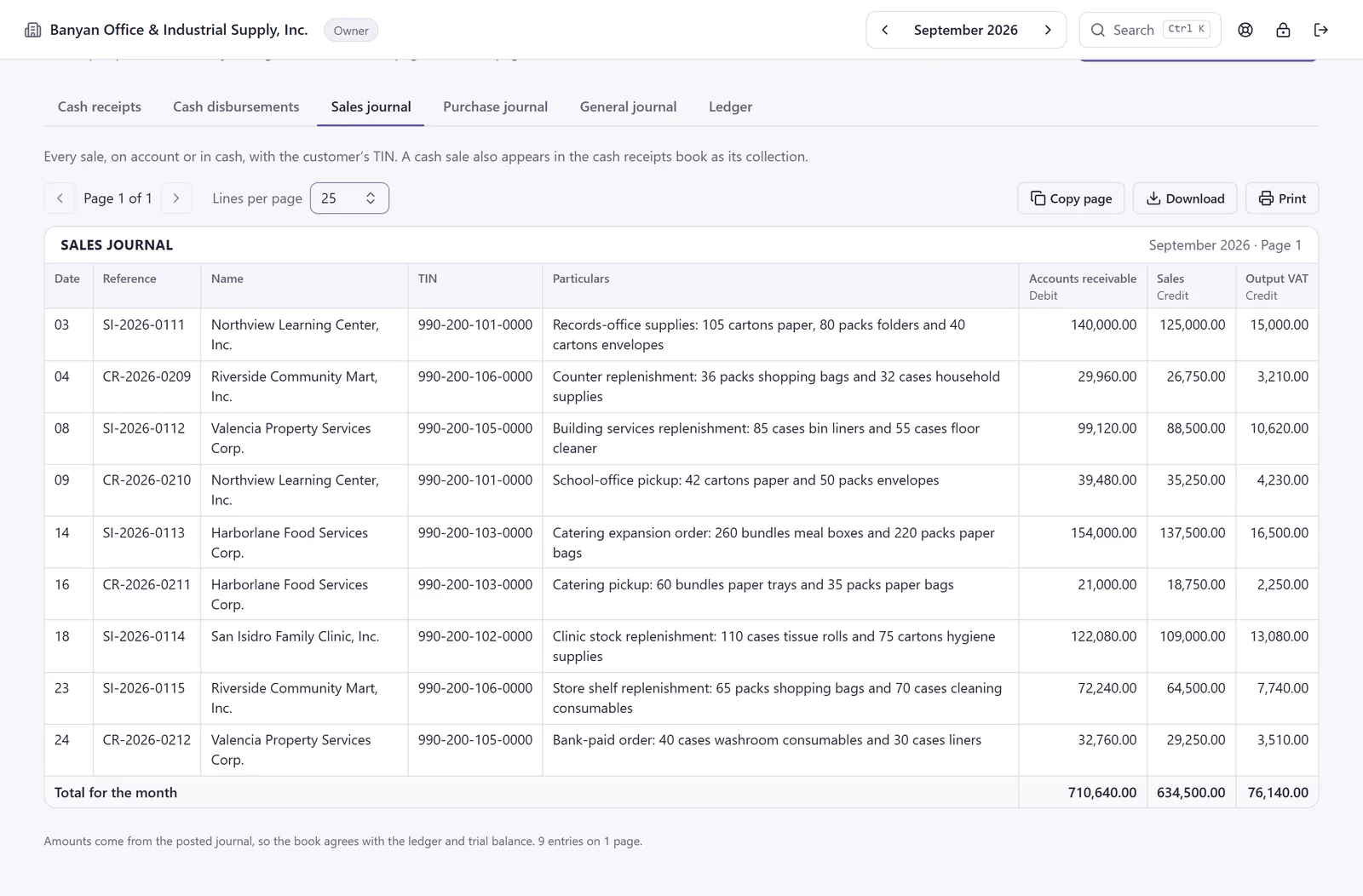
Cash receipts, cash disbursements, the sales and purchase journals and the general journal, page by page, with totals brought and carried forward. Write them into your registered manual books, print them for your registered loose-leaf books, or download the month to Excel. Mark each book written up. Anything posted afterwards gets a New tag until you write it in.

The September 2026 sales journal, page 1, with each customer's TIN and a total for the month of 710,640.00 in accounts receivable, 634,500.00 in sales and 76,140.00 in output VAT.
September's sales journal. Accounts receivable equals sales plus output VAT.

Step 4: Prepare the returns

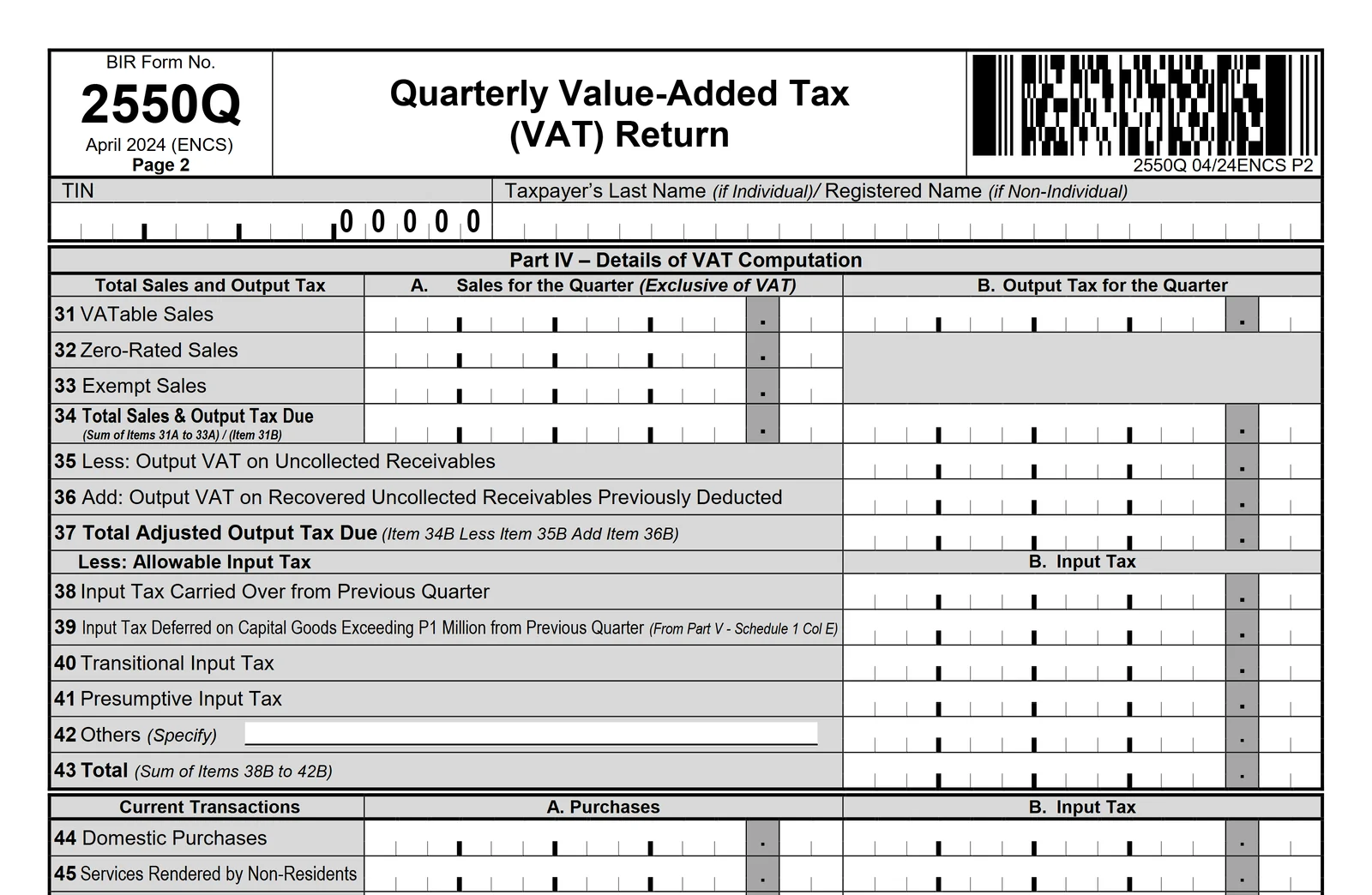
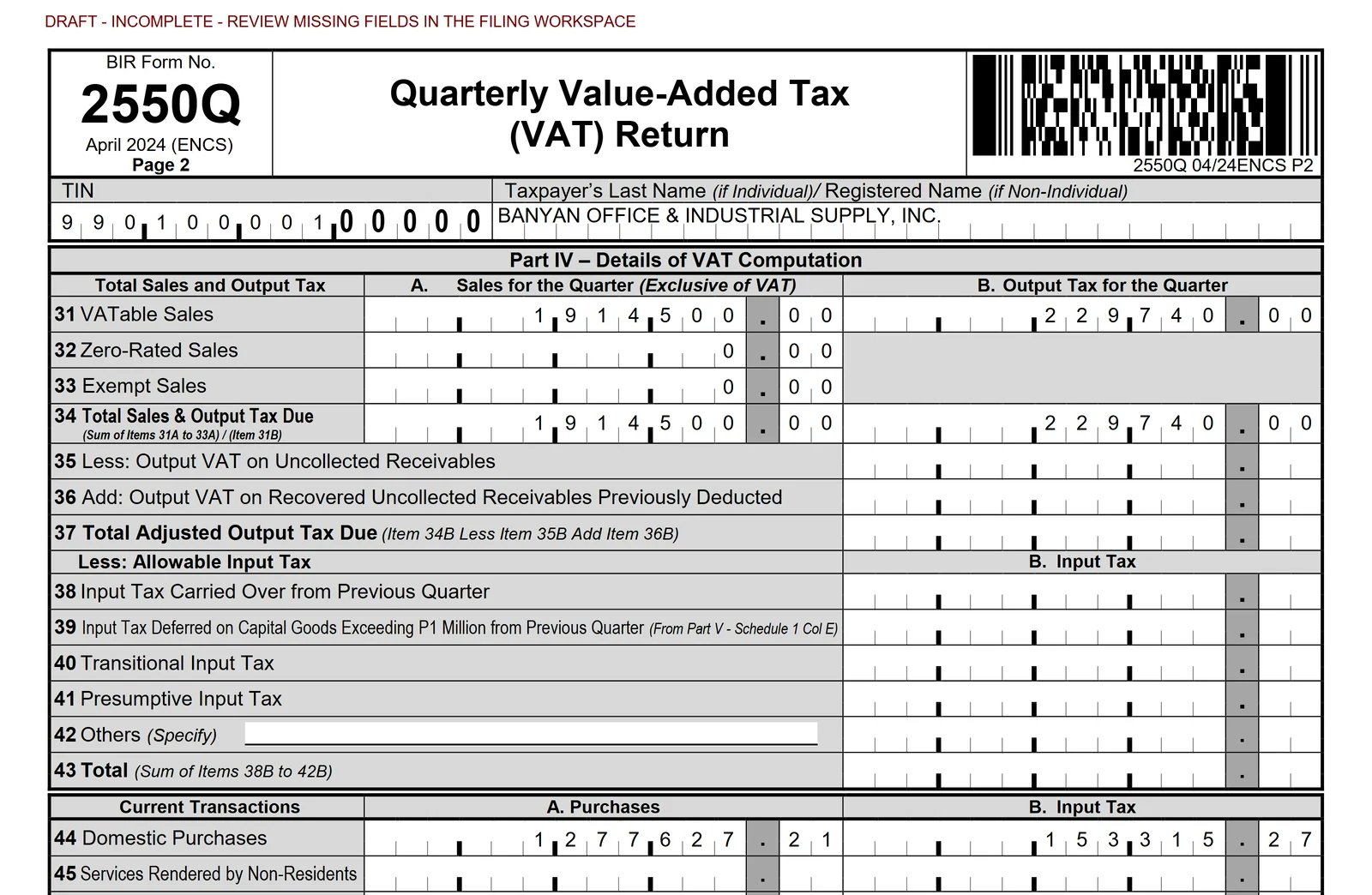
The same entries fill in the official 2550Q, 1601-EQ and 1601-C. Drag across to compare the blank form with the filled one. Figures only you hold, such as input VAT carried over from last quarter, wait for you under Details to complete instead of a guessed zero, and the draft is marked incomplete until they're in.

The fictional sample's 2550Q covers July to September 2026.

Page 2 of the blank official 2550Q, April 2024 edition: Part IV, items 31 to 45, all empty.
The same page filled in by Mage for Q3 2026 under a DRAFT - INCOMPLETE header: VATable sales and output VAT in items 31A and 31B, domestic purchases and input VAT in items 44A and 44B, and the items left for you to complete still blank.
Page 2 of the 2550Q: Mage's draft on the left, the blank official form on the right.

Step 4 · Downloads

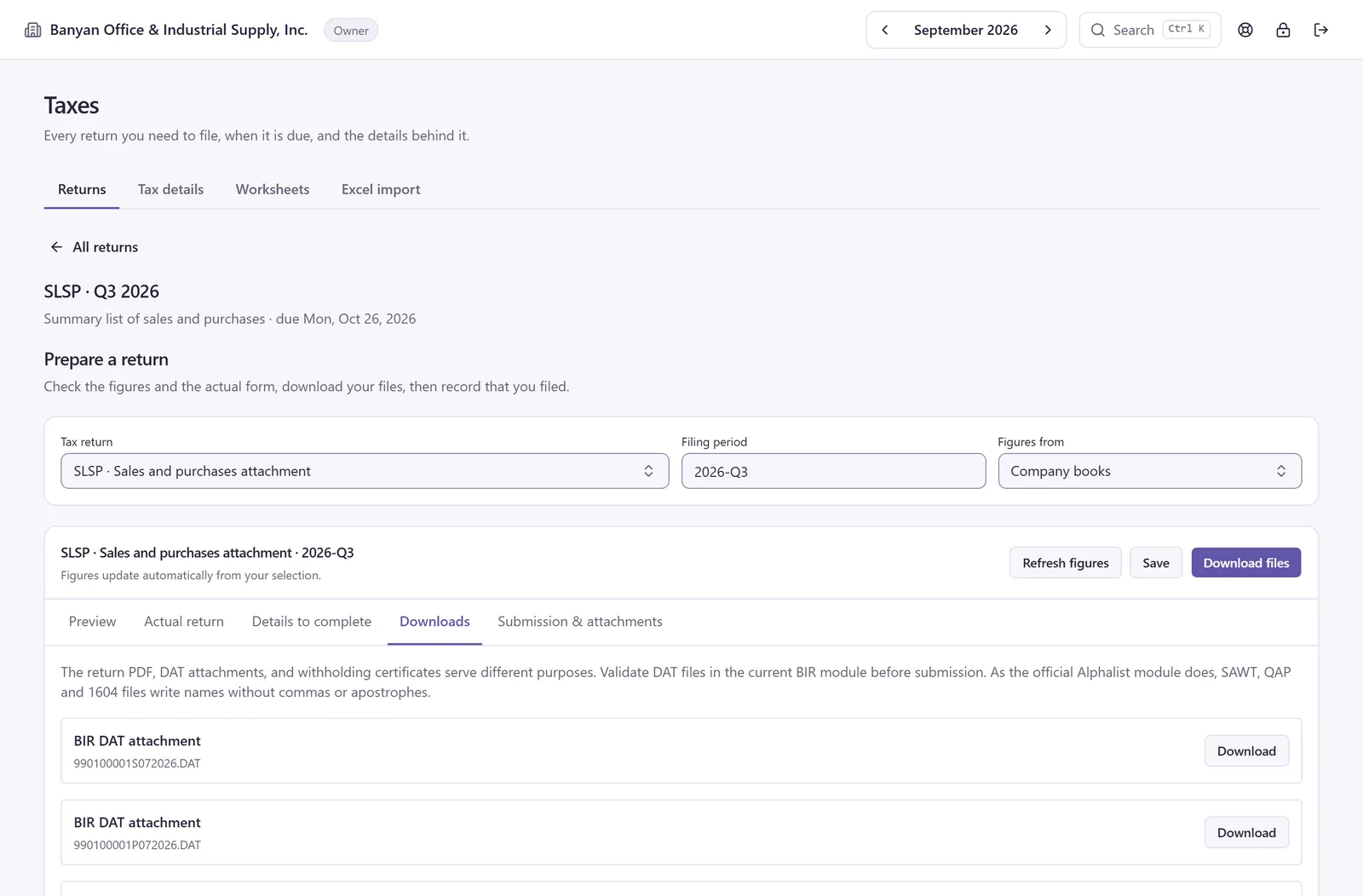
Each return's Downloads tab has its DAT files, named the way BIR expects, and the 2307s for your suppliers. Mage writes names in BIR's format for you: ñ becomes n, accents drop and & becomes AND. Your records keep them as typed.

The SLSP return for Q3 2026 on its Downloads tab, listing the summary lists of sales and purchases as BIR DAT attachments, each with a Download button. Also on this tab, for September 990100001S092026.DAT 990100001P092026.DAT
SLSP for Q3 2026: one DAT file a month for sales and one for purchases.

Step 5: Mark done and lock the month

Lock September and nothing dated in it can be posted by mistake, from any screen. Reopening asks why, and both the close and the reopen are recorded with who did it and when.

Mark done and lock the month (done)

Closed. Nothing dated in September 2026 can be posted until it is reopened.

  • Month closed · you · just now
Try it: a working copy of the real control. It touches no books.

See the arithmetic

Pick a supplier. Mage does the arithmetic.

The same VAT and withholding Mage works out when you post, to the centavo. Change a field and it stays yours.

Eastline, Solana and Northview are fictional sample companies · runs in your browser · nothing is sent or saved.

Start from

  • Delivery bill · Eastline
  • Office rent · Solana, WC100 5%
  • Rounding · ₱1,000.00
Supplier
Eastline Cargo & Delivery Services, Inc.Usually 5240 · Vatable · WC120
Type
Paid expense
Amount (VAT inclusive)
₱12,320.00
Account from supplier
5240 Transportation and Travel
VAT treatment from supplier
Vatable 12%
Our company is VAT-registered
Yes
ATC from supplier
WC1202.00% · Contractors (corp)

Rate looked up from Mage's table, not typed by hand.

Workpaper

Eastline Cargo & Delivery Services, Inc.

CV-2026-0613 · paid 21 Sep 2026

Working

Amount, VAT inclusive
₱12,320.00
VAT (12/112)
₱1,320.00
Net of VAT
₱11,000.00
Withheld (WC120, 2%)
₱220.00
You paid
₱12,100.00
See the computation

VAT 1,232,000 × 12 ÷ 112 = 132,000 → ₱1,320.00

Net 1,232,000 − 132,000 = 1,100,000 → ₱11,000.00

Withheld 1,100,000 × 200 ÷ 10,000 = 22,000 → ₱220.00

Paid 1,232,000 − 22,000 = 1,210,000 → ₱12,100.00

Amounts in centavos, the way Mage keeps every amount. WC120 is 2.00%, or 200 basis points.

The entry Mage posts

The journal entry Mage posts for this paid expense
Account Debit Credit
5240 Transportation and Travel 11,000.00
1300 Input VAT 1,320.00
2300 Withholding Tax Payable – Expanded 220.00
1010 Cash in Bank 12,100.00
Balanced · ₱12,320.00 = ₱12,320.00

Where it lands

Lands in

  • Purchase journal
  • Cash disbursements book

Also counted in

  • 2550Q+₱11,000.00 into 44A, +₱1,320.00 into 44B
  • 1601-EQ+₱220.00 on the WC120 line
  • 2307Eastline's 2307 for the quarter
  • QAPEastline's quarter
  • SLP DATAdded to Eastline's line for the month (one line per supplier per month)

The invoice

Northview Learning Center, Inc.

SI-2026-0111 · 3 Sep · ₱140,000.00

VAT ₱15,000.00 · net ₱125,000.00

The journal entry for invoice SI-2026-0111
Account Debit Credit
1100 Accounts Receivable 140,000.00
4000 Sales 125,000.00
2200 Output VAT 15,000.00
Balanced · ₱140,000.00 = ₱140,000.00

The collection

Northview withheld 1% (WC158) and gave you a 2307.

Amount applied to the invoice
₱140,000.00, in full

A payment can never be more than what's still owed. The amount applied includes what Northview withheld.

Workpaper

Collection from Northview

As collected on 17 Sep in the sample books

Working

Amount applied
₱140,000.00
Base (the VAT-exclusive share)
₱125,000.00
Withheld (WC158, 1%)
₱1,250.00
Cash received
₱138,750.00
See the computation

Base 14,000,000 × 12,500,000 ÷ 14,000,000 = 12,500,000 → ₱125,000.00

Withheld 12,500,000 × 100 ÷ 10,000 = 125,000 → ₱1,250.00

Cash 14,000,000 − 125,000 = 13,875,000 → ₱138,750.00

Amounts in centavos. The base is the invoice's net share of what you applied: ₱125,000.00 of ₱140,000.00.

The entry Mage posts

The journal entry Mage posts for this collection
Account Debit Credit
1010 Cash in Bank 138,750.00
1310 Creditable Withholding Tax 1,250.00
1100 Accounts Receivable 140,000.00
Balanced · ₱140,000.00 = ₱140,000.00

Into your SAWT

The ₱1,250.00 flows into your SAWT, the list of 2307s your customers gave you.

99010000100000920261702Q.DAT · Northview's line
DSAWT,D1702Q,1,990200101,0000,"Northview Learning Center Inc.",,,,09/2026,,WC158,1.00,125000.00,1250.00

One line per customer

Northview also bought ₱39,480.00 in cash on 9 Sep: net ₱35,250.00, VAT ₱4,230.00. The summary list of sales adds a customer's month into one line.

SI-2026-0111 · invoice · 3 Sep

125,000.00

net of VAT · VAT 15,000.00

Cash sale · 9 Sep

35,250.00

net of VAT · VAT 4,230.00

Northview · September 2026

160,250.00

one line · VAT 19,230.00

125,000.00 + 35,250.00 = 160,250.00 VAT 15,000.00 + 4,230.00 = 19,230.00

990100001S092026.DAT · Northview's line for September
D,S,"990200101","Northview Learning Center Inc.",,,,"18 Narra Lane Brgy Pinyahan","Quezon City",0.00,0.00,160250.00,19230.00,990100001,09/30/2026

Say September 2026 is already closed. Here's how Mage answers each attempt.

Post an entry that doesn't balance

Debit rent ₱1,000.00, credit the bank ₱900.00, and post.

5200 Rent Expense Dr ₱1,000.00

1010 Cash in Bank Cr ₱900.00

Difference₱100.00

Debits and credits must balance. Current difference: ₱100.00.

Post into a closed month

An entry dated 30 Sep 2026, after September was closed.

September 2026 · Closed

5200 Rent Expense Dr ₱1,000.00

1010 Cash in Bank Cr ₱1,000.00

Dated30 Sep 2026

This month is closed. Reopen it before posting anything dated in it.

Reopening asks for a reason, and both the close and the reopen are recorded with who and when.

Change a posted entry

This entry posted on 1 Oct 2026. Now change its amount.

Posted · 1 Oct 2026

5200 Rent Expense Dr ₱1,000.00

1010 Cash in Bank Cr ₱1,000.00

Mage has no edit for a posted entry. Reverse it instead.

The original stays in your history. A reversal, with a date and a reason, posts a separate entry with opposite amounts.

Magica, your AI assistant

Ask Magica. It reads your books, then waits for your Confirm.

Ask in English or Filipino. Magica answers from your own books and from notes on Philippine tax that link to their sources.

  • How do I…? A short answer, with a Show me button that opens the screen and points at the field.
  • Tax and payroll questions. Answered from short notes on Philippine tax and payroll rules, each linking to its sources.
  • Your figures. Sales so far, cash and bank balances, unpaid invoices and bills, read from your books, the same figures your reports show.
  • Drafts. Sales, expenses, payments and journal entries, typed or read from a photo of a receipt.

Nothing posts until you press Confirm. Each draft is checked again with the same rules as its screen, and the entry says Magica prepared it and who confirmed it.

Included in every plan; Pro and Pro Max raise its monthly limits. See pricing ↓

  1. You: Record this receipt. receipt-eastline.jpg
  2. Magica:

    Here is the paid expense I read from it. Check it, then confirm.

    Paid expense · draft21 Sep 2026

    Supplier
    Eastline Cargo & Delivery Services, Inc.
    Account
    5240 Transportation and Travel
    VAT
    1,320.00
    Withheld (WC120)
    220.00
    Total
    12,320.00

    Buttons: Confirm, Open on the screen, Discard.

A receipt photo drafted as a paid expense, waiting for Confirm.

Due dates

A year of due dates, worked out from the rules.

Switch on what applies to your company. The dates come from the same rules the app uses.

Due-date rules for the returns Mage prepares
Return Due On a Saturday or Sunday
Income tax (a corporation’s dates shown)
1702Q Quarterly corporate income tax return 60 days after each of the first three quarters Moves to the Monday after
1702-RT Annual corporate income tax return 15 April of the next year, covering the fourth quarter too Moves to the Monday after
VAT-registered
2550Q Quarterly VAT return The 25th of the month after each quarter Moves to the Monday after
SLSP Summary list of sales and purchases The 25th of the month after each quarter Moves to the Monday after
Not VAT-registered
2551Q Quarterly percentage tax return The 25th of the month after each quarter Moves to the Monday after
We withhold tax from suppliers
0619-E Monthly remittance of expanded withholding The 10th of the next month, for the first two months of each quarter Moves to the Monday after
1601-EQ Quarterly expanded withholding return The last day of the month after each quarter Moves to the Monday after
1604-E Annual information return on expanded withholding 1 March of the next year Moves to the Monday after
We have employees
1601-C Monthly withholding on compensation The 10th of the next month; December's on 15 January Moves to the Monday after
1604-C Annual information return on compensation 31 January of the next year Moves to the Monday after
Customers withhold tax from us
SAWT Summary of taxes withheld by customers With the income tax return: 60 days after each quarter, with the 1702Q; the fourth quarter's on 15 April, with the annual 1702 Moves to the Monday after
We withhold final tax
0619-F Monthly remittance of final withholding The 10th of the next month, for the first two months of each quarter Moves to the Monday after
1601-FQ Quarterly final withholding return The last day of the month after each quarter Moves to the Monday after
1604-F Annual information return on final withholding 31 January of the next year Moves to the Monday after

A due date on a Saturday or Sunday moves to the Monday after.

These are a corporation's or partnership's dates. A sole proprietor's SAWT goes with the 1701Q on 15 May, 15 August and 15 November, and the annual 1701 on 15 April.

Every January, the year comes due. December's 1601-C on the 15th. The Q4 2550Q and SLSP on the 25th. The Q4 1601-EQ and the 1604-C, with your employees' 2316s, by the 31st. The 1604-E follows on 1 March.

When December closes in Mage, its returns are next on the checklist, prepared from books you've kept up all year. Year-end payroll walks you through each employee, then produces the 2316s and the 1604-C DAT file.

Every return opens the day after its period ends. See how the forms were checked ↓

Evidence

Our sample files pass BIR's own validators.

We run our sample company's DAT files through the same validators BIR gives every filer.

Our sample company's 12 DAT files went through BIR's own validators. No errors.

On 1 October 2026 we ran the DAT file types Mage wrote then (summary lists, SAWT, the 1601-EQ QAP, and the 1604-E and 1604-C alphalists) through BIR's RELIEF 2.3 and Alphalist 7.4 validators, using Banyan Office & Industrial Supply, Inc., our fictional sample company, whose books start in July 2026.

Since then Mage writes the SAWT as one file per return, covering the whole quarter, as BIR's own Alphalist program does. The three SAWT files below are the earlier monthly files; the quarterly file is next in line for the validator.

Your own files go through the same check: run them through BIR's validator before you submit, as BIR asks of every filer.

12 of 12

sample files passed with no errors

  1. RELIEF 2.3
    990100001S072026.DAT

    Sales · July 2026

    No errors encountered.

  2. RELIEF 2.3
    990100001P072026.DAT

    Purchases · July 2026

    No errors encountered.

  3. RELIEF 2.3
    990100001S082026.DAT

    Sales · August 2026

    No errors encountered.

  4. RELIEF 2.3
    990100001P082026.DAT

    Purchases · August 2026

    No errors encountered.

  5. RELIEF 2.3
    990100001S092026.DAT

    Sales · September 2026

    No errors encountered.

  6. RELIEF 2.3
    990100001P092026.DAT

    Purchases · September 2026

    No errors encountered.

  7. Alphalist 7.4
    99010000100000720261702Q.DAT

    SAWT · July 2026

    No Errors Encountered

  8. Alphalist 7.4
    99010000100000820261702Q.DAT

    SAWT · August 2026

    No Errors Encountered

  9. Alphalist 7.4
    99010000100000920261702Q.DAT

    SAWT · September 2026

    No Errors Encountered

  10. Alphalist 7.4
    99010000100000920261601EQ.DAT

    QAP · 1601-EQ, Q3 2026

    No Errors Encountered

  11. Alphalist 7.4
    9901000010000123120261604C.DAT

    1604-C · 2026, Jul–Sep

    No Errors Encountered

  12. Alphalist 7.4
    9901000010000123120261604E.DAT

    1604-E · 2026, Jul–Sep

    No Errors Encountered

990100001S092026.DAT Summary list of sales, September 2026 · lines 1 and 3 of 6, byte for byte
H,S,"990100001","Banyan Office  Industrial Supply Inc.","","","","","Unit 3 42 Sampaguita Street Barangay Palanan","Makati City",0.00,0.00,634500.00,76140.00,050,09/30/2026,1
D,S,"990200101","Northview Learning Center Inc.",,,,"18 Narra Lane Brgy Pinyahan","Quezon City",0.00,0.00,160250.00,19230.00,990100001,09/30/2026
Written as AND for you: Mage cleans names for BIR's format as it writes the file. Your records keep the name exactly as typed.

Names are cleaned for BIR's format automatically. & becomes AND, ñ becomes n, José becomes Jose, and punctuation BIR's format refuses is left out. Your records keep every name exactly as typed.

Mage does

  • Prepares your books-of-accounts pages, ready to write into your manual or loose-leaf books
  • Fills in your VAT, percentage tax, withholding and income tax returns on the official forms, unsigned
  • Produces unsigned 2307s, 2306s and 2316s
  • Writes SLS, SLP, SAWT, QAP and alphalist DAT files
  • Lists each return's due date and status
  • Keeps the exact figures and files behind each filing, amendments included

You review, sign and submit

  • Review every figure, then sign each return
  • Submit and pay through BIR's channels, eBIRForms or eFPS
  • Run your DAT files through BIR's validator, as BIR asks of every filer
  • Write each month's pages into your registered books
  • Bind printed loose-leaf pages and register them with BIR within 15 days after the end of the year

Rules

  • Every entry balances before it posts.
  • Every amount is stored as whole centavos, so totals add up exactly.
  • Posted entries can't be changed or deleted; a mistake is voided with a reversing entry and a reason that's kept permanently.
  • A closed month refuses new postings from every screen.
  • A payment can never be more than what's still owed.

Security

  • Two-factor sign-in with an authenticator app and recovery codes.
  • Sessions held on the server and revocable at once.
  • Password reset links that expire in 30 minutes and sign you out everywhere.
  • Company access re-checked on every request.
  • Every posting, close, reopen, tax-detail decision, filing step and deletion recorded with who and when.
  • Automatic daily backups at 2:00 a.m. Manila time.
  • Runs on secure global cloud infrastructure, with automatic daily backups. Nothing to install.

The 12 validator reports

As BIR's RELIEF 2.3 and Alphalist 7.4 wrote them on 1 October 2026, for our fictional sample company.

Loading the 12 reports…

Who it's for

Two people close a month. Mage is built for both.

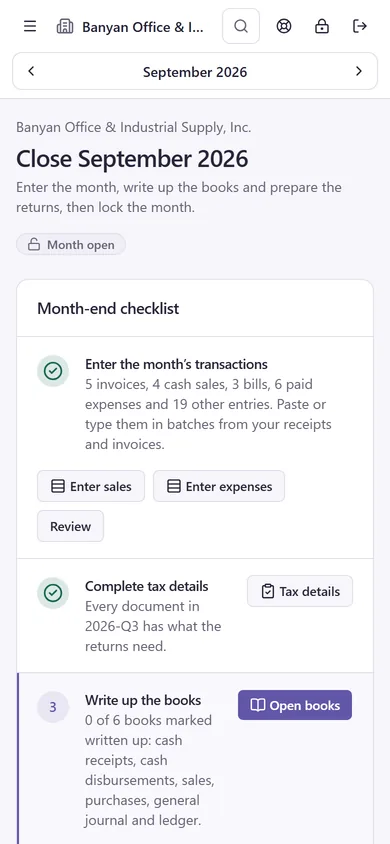
Mage's month-end screen on a phone: Close September 2026, the month still open, and the month-end checklist with its first step, entering the month's transactions, done

If you own the business: know where the month stands without asking.

  • One checklist for the month, with the next step and every due date.
  • Lock a month once it's done. Reopening asks for a reason.
  • See who owes you and whom you owe. E-mail statements of account, aged from current to over 90 days.
  • Profit and loss and a balance sheet for any period.
  • Works in your phone's browser. Nothing to install.
  • Have a bookkeeper or accountant? They work in your company with their own sign-in, and you both see the same month.
How many companies do you keep?
Banyan Office & Industrial Supply, Inc. Admin
  • Banyan Office & Industrial Supply, Inc. (current)
  • Client company 2
  • Client company 3
  • Client company 4
  • Client company 5
  • Client company 6
  • Client company 7

Search appears after six companies

If you keep the books: every client, one sign-in.

  • One sign-in for every client. Switch companies from the top bar. A search box appears once you have more than six.
  • Paste a client's month from Excel or Google Sheets. Pick a supplier, and the account, VAT and ATC fill in.
  • Fix missing VAT treatments, purchase types, input VAT credits and withholding in one table, and apply one to up to 200 documents at a time.
  • Clients who live in spreadsheets: import up to 5,000 rows to prepare SLSP and 1604-E worksheets without touching the ledger.
  • Owner, admin and member roles. Members view and preview; admins and owners record, prepare and file. Owners void transactions and admins can void pay runs, and the reason is kept.

One person can work in several companies, and a company can have several people, each with their own sign-in and role. Our team sets up each company and who can access it; how many depends on the plan.

Moving in

Switching is our job, not yours.

Send us your books. Our team moves them into Mage, so your first month starts where your last one ended.

One workbook, imported by our team

Company details and tax profile, chart of accounts, contacts, employees, opening balances with unpaid invoices and bills, and the transactions since. Every sheet is optional. We check the preview with you, then import it with your BIR Form 2303 and SEC papers.

The workbook's sheets, from company details to transactions, become your company in Mage.

Starting mid-year

Start from 1 January and bring in the months so far, so the year's 2316s, 1604-C and 1604-E cover the whole year. Or start from your last trial balance; it posts as one opening entry.

Returns filed before Mage

Tell Mage the month your earlier returns were filed through. They show as filed outside Mage, not overdue, and later returns ask only for what carries forward, such as earlier quarters' income tax.

Pricing

Plans that keep your books in order.

  • Pro

    Coming soon

    ₱5,000 / month

    • Everything in Standard
    • Up to 5 users per company, or 5 companies per person
    • 5× Magica limits
    • Annual FS draft with notes
  • Pro Max

    Coming soon

    ₱15,000 / month

    • Everything in Pro
    • Up to 20 users per company, or 20 companies per person
    • 20× Magica limits
    • AI-powered tax audit preparedness tool (see the note under the plans)

Every company is on Standard or higher. Pro and Pro Max can cover a company (all its users) or a person (every company they work in). A person on Standard can be in up to 3 companies.

*A preparation aid, not a substitute for advice from a licensed tax professional or lawyer.

Prices in Philippine pesos. Coming-soon plans and features may change.

FAQ

Straight answers.

Anything else? Ask in your request, or email us at support@magetechsystems.com.

Get started →
How do plans work?

Every company is on a plan. Standard is ₱1,000 per company per month, for up to 3 users, with Magica included. Pro (₱5,000 a month) and Pro Max (₱15,000 a month), coming soon, add users, companies per person and higher Magica limits, and can cover a company or a person. See pricing.

Can several users work with several companies?

Yes. Each person has their own sign-in and can belong to several companies, and each company can have several users, each with their own role. On Standard a company has up to 3 users and a person can be in up to 3 companies; Pro and Pro Max raise both. Our team sets up who can access each company.

Is Magica safe with my books?

Magica reads your books to answer you, but never changes them on its own. A draft posts only when an owner or admin presses Confirm, after the same checks as its screen, and the entry records that Magica prepared it and who confirmed it.

Tax answers come from notes on Philippine tax that link to their sources, with a reminder to confirm with a licensed professional. Magica runs on Claude, by Anthropic, listed with our sub-processors.

Which returns does it prepare?

VAT (2550Q) and percentage tax (2551Q). Expanded withholding (0619-E, 1601-EQ), withholding on compensation (1601-C) and final withholding (0619-F, 1601-FQ, 1604-F). Income tax: the 1702Q and the 1702-RT, 1702-EX or 1702-MX; the 1701Q and the 1701, 1701A or 1701-MS. Certificates 2307, 2306 and 2316. DAT files for the SLS, SLP, SAWT, QAP and the 1604-E, 1604-C and 1604-F alphalists.

Each return is the official BIR PDF, filled in and unsigned. Several also come with an eBIRForms save file. Those files haven't been tried in eBIRForms yet, so open and validate yours there, and check its figures against Mage's, before you file.

Does Mage file or pay my taxes?

No. Mage prepares your returns, DAT files and certificates; you file and pay through BIR’s channels, eBIRForms or eFPS, then record in Mage when and how you filed, with your proof attached.

Does it run payroll?

Yes: monthly, semi-monthly, weekly or daily, with SSS, PhilHealth, Pag-IBIG and withholding on compensation from dated tables, by branch if you have branches. Each run posts to your books and feeds the 1601-C; at year end Mage prepares the 2316s and the 1604-C.

Does Mage need to be registered with BIR?

BIR doesn't accredit or approve accounting software, so no software is "BIR-accredited". What BIR registers is your company's books, and how depends on how you keep them.

Manual books: write in Mage's pages as usual. Loose-leaf books printed from Mage: get BIR's Permit to Use, then bind and register the printed pages within 15 days after the end of the year. If your company uses Mage itself as its computerized books, file for an Acknowledgment Certificate with your RDO (RMO 9-2021).

We keep manual books. Can we use Mage alongside them?

Yes. Your registered manual books stay your books of accounts, and Mage is where you prepare what goes in them, the way many companies use Excel. Nothing about your registration changes.

Write each month's entries into your books as you go, not all at once before an audit. Issue invoices from your own BIR-registered invoice booklets; Mage doesn't issue invoices. Show examiners your registered books, not Mage's screens or printouts.

Is my business a good fit?

Mage fits Philippine companies that keep manual or loose-leaf books, VAT-registered or not, with or without branches, that withhold from suppliers and run payroll, and the bookkeepers and accountants who keep their books. Trading, retail, services, restaurant, construction, manufacturing and leasing companies each start from a chart of accounts made for their industry.

What does setting up a company involve?

Our team does it with you. Send your books in one workbook (company details, tax profile, chart of accounts, contacts, employees, opening balances and transactions) and we import it after you check the preview. We also create each person's sign-in and role; ask us when someone joins or leaves.

Can we switch mid-year?

Yes. Start from 1 January and bring in the months so far, so the year's 2316s, 1604-C and 1604-E cover the whole year, or start from your last trial balance as one opening entry.

Returns your accountant filed before Mage show as filed outside Mage, and the next ones ask only for what carries forward from them.

Can we take our books out if we stop?

Yes. Download each month's books as an Excel workbook, the general ledger and trial balance as CSV, the VAT, withholding and alphalist worksheets as CSV or Excel, and each filing's PDFs, DAT files and saved figures.

Will BIR accept my DAT files?

Mage writes them in BIR's format and cleans names for it automatically: & becomes AND, ñ becomes n, accents are dropped and punctuation BIR's format refuses is left out. Your records keep every name exactly as typed.

Our fictional sample company's 12 files passed BIR's RELIEF 2.3 and Alphalist 7.4 validators with no errors. As BIR asks of every filer, run your files through its validator before you submit.

Which withholding codes are included?

The expanded withholding codes companies use most (professional fees, rentals, contractors, brokers, credit card companies, suppliers to government and to top withholding agents, agricultural products and minerals) and the regular final withholding codes. Pick the code and Mage looks up its rate.

Does it use AI?

Only in Magica and in converting a spreadsheet to a Mage template. Your books, returns and reports never come from AI: every figure comes from entries you posted and your tax profile, by rules you can check. Where a figure would need a guess, Mage leaves it blank for you.

Where is our data?

On secure global cloud infrastructure, with automatic daily backups. The privacy notice lists who hosts it and where. Mage works in any browser, phones included; there's nothing to install.

Free tool

Already keep your sales and purchases in Excel?

Get SLSP, QAP and 1604-E DAT files from them with the free Excel-to-BIR tool. No account needed; your files are read in your browser and never uploaded.

Open the free tool

Close your first month with Mage.

Tell us about your books, and we'll reply by email and set up your company for you.

What happens next

  1. We reply by email.
  2. Our team sets up your company and who can access it.
  3. We import your books from one workbook, and you close your first month.

All fields are required unless marked optional.

I am a…
Returns you prepare optional

Pick any that apply. The due-date switches above fill these in too.

This form needs JavaScript to send. Turn JavaScript on and reload this page to send your request.Add your name, email and company, choose your role and tick the consent box to send.